
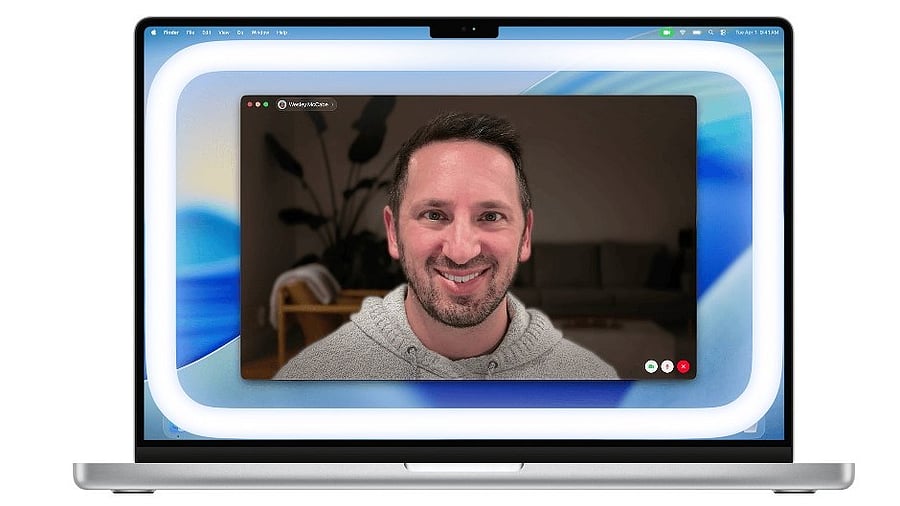
Edge Light feature on Mac laptop.
Credit: Apple
Apple has begun rolling out the much-awaited macOS 26.2 (Tahoe) update to all eligible Mac computers worldwide.
One of the most interesting features coming with the new macOS 26.2 update is the Edge Light.
It is a new video effect which makes full use of the bright displays on Mac. It will fill light to the owner's face, like a virtual ring light during the video conference calls.
Also, the users get the option to adjust the brightness level and a warmer or cooler light tone to suit their preference. And the light is smart, receding from the mouse pointer when the user gets close to the edge of the screen, so he/she can always access the content.
Apple M silicon, found in all the Mac computers since 2020, powers the Edge Light feature. The chipset comes paired with an advanced Apple Neural Engine, which enables the sensors in the Mac PCs to detect faces, their relative size, and where they are located in the camera feed, and the Image Signal Processor understands light levels very precisely to adjust the auto brightness level depending on the light that’s needed in the scene.
Edge Light joins the list of built-in video conferencing effects on macOS, including Studio Light, Portrait mode, virtual backgrounds, and Voice Isolation. These features promise to enhance the overall user experience during a video call or a virtual office meeting, no matter which video conference application the owner is using.
Edge Light feature in the Settings.
Credit: Apple
The Edge Light is said to work best in low-light conditions, such as dim indoor lighting at night. Users can combine it with any of the other effects.
As noted earlier, Edge Light is available on all Mac models with Apple silicon. Further, users on Mac models introduced in 2024 and newer versions can choose to have the effect turn on automatically when they’re in low light.
Here's how to enable Edge Light on Apple Mac devices:
Step 1: From the Video menu that appears in the menu bar when a video call is in progress, choose Edge Light to turn the effect on or off.
If using your computer’s built-in camera, the effect appears on your built-in display.
If using Continuity Camera or another external camera, the effect appears on your primary display. (When using multiple displays, this is the display that you assigned the menu bar when arranging displays in Displays settings.)
Step 2: When Edge Light is turned on, click the arrow next to Edge Light in the menu to reveal additional controls:
A brightness slider to adjust illumination by changing the width of the effect.
A colour temperature slider to make the effect more or less warm. Warmer colour temperatures show more yellow and less blue.
A setting to enable Edge Light to turn on automatically when you start a video call and the ambient light is low. This setting is available on Mac models introduced in 2024 or later.
List of Mac computers eligible for macOS 26.2:
The new macOS 26.2 is coming to MacBook Air with Apple silicon (2020 and newer versions), MacBook Pro with Apple silicon (2020 and newer versions), MacBook Pro (16‑inch, 2019), MacBook Pro (13‑inch, 2020, Four Thunderbolt 3 ports), iMac (2020 and newer versions), Mac mini (2020 and newer versions), Mac Studio (2022 and newer versions), and Mac Pro (2019 and newer versions).
Get the latest news on new launches, gadget reviews, apps, cybersecurity, and more on personal technology only on DH Tech.